 002call
 By Will ZhouLast edited: 5 Nov, 2026
What Does ##002# Do? How to Cancel All Call Forwarding
Quick answer
To turn off all call forwarding on your mobile line, dial ##002#. Open your phone's keypad, type ##002# and press call.
It removes every type of forwarding at once:
- all calls
- calls when you're busy
- calls you don't answer
- calls when your phone is off or has no signal
##002# is a standard code defined in the GSM standard (3GPP TS 22.030), so most mobile networks accept it. ## means erase, and 002 means all call forwarding. Some carriers use their own codes instead. Verizon, for example, uses *73.
What Happens When You Dial ##002#?
After you dial ##002# and press call, your phone sends the code to your carrier. On Android, a short message first says "MMI code started."
A few seconds later, a box shows your carrier's reply: "Call forwarding, All, Erase successful." Tap OK. Forwarding is now off.
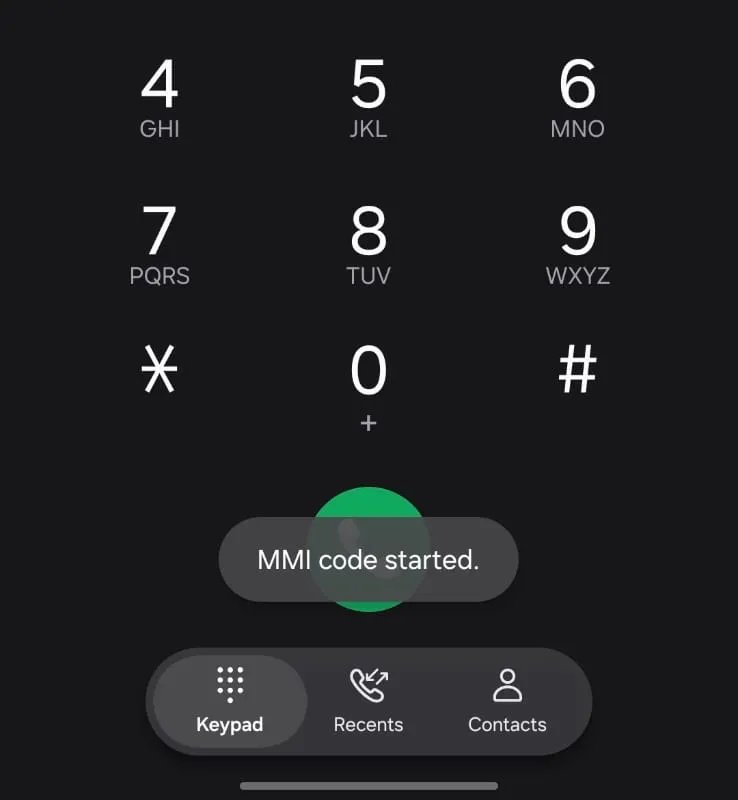
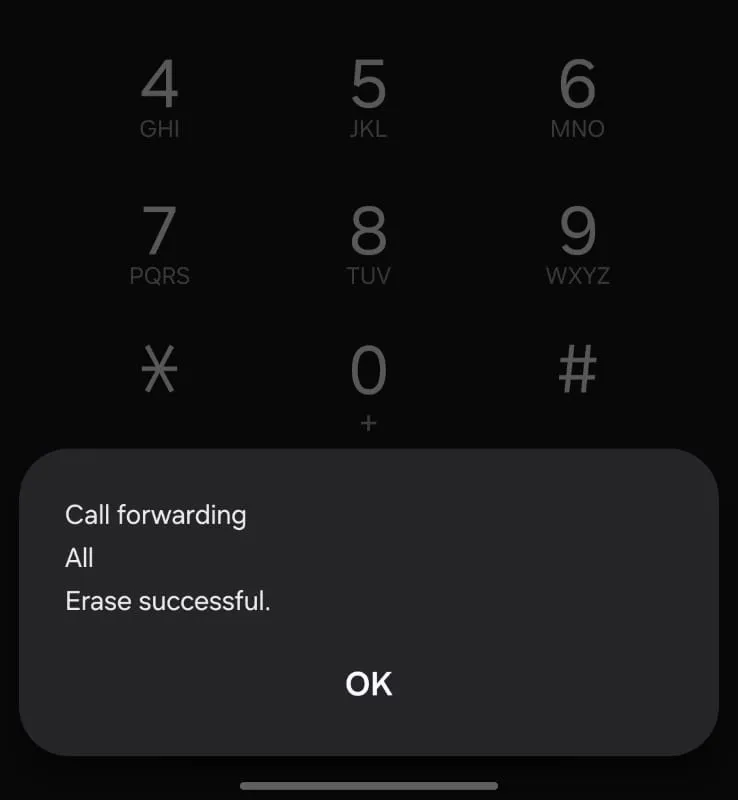
The exact wording depends on your phone and carrier. If nothing appears, see "Why Isn't ##002# Working?" below.
Does ##002# Turn Off Voicemail?
Yes, ##002# can turn off voicemail. On many networks, voicemail is a type of call forwarding: calls you miss are forwarded to your voicemail box. Telstra in Australia, for example, lists calls sent to its MessageBank voicemail as one of the diverts you cancel with ##002#.
So after ##002#, missed calls may just ring out instead of going to voicemail.
If you want to keep voicemail:
- Erase only forwarding for all calls with
##21#. Voicemail for missed calls stays on. - Or dial
##002#anyway, then turn voicemail back on through your carrier's app, website or support line.
How Do I Check Call Forwarding Is Off?
To check ##002# worked, dial a status code and press call. Your carrier replies with whether that type of forwarding is on:
| Code | Checks forwarding for |
|---|---|
*#21# | All calls |
*#67# | Calls when you're busy |
*#61# | Calls you don't answer |
*#62# | Calls when your phone is off or has no signal |
You can also check in your phone's settings. On iPhone, open Settings > Apps > Phone > Call Forwarding. On Android, open the Phone app's settings and look for call forwarding. The menu names change between phone makers.
The simplest test is to call your number from another phone and see if it rings.
When Should You Use ##002#?
Use ##002# when calls aren't reaching your phone, or when you're not sure what forwarding is set on your line.
- Your phone stopped ringing, but people say they called you.
- You set up forwarding for a trip or time off and forgot to turn it off. If you forwarded calls to avoid roaming fees, see how to avoid roaming charges on calls.
- You got a used phone or a reused SIM, and the last owner's forwarding is still on.
- You think someone set up forwarding on your line without asking you. See the next section.
What Is a Call Forwarding Scam?
A call forwarding scam is when someone tricks you into dialing a code that sends your calls to their number.
Never dial a code someone gives you
If a caller or a message asks you to dial a code that starts with * or ** and has a phone number in it, hang up. A code like **21* followed by a number and # forwards all your calls to that number.
The caller usually says they're from your carrier, your bank or a delivery company, and gives a reason to dial the code. Once forwarding is on, your calls ring their phone instead of yours. That includes calls from your bank or from apps that read out a login code.
If you think it happened to you:
- Dial
##002#to erase all forwarding. - Call your carrier and ask them to confirm forwarding is off.
- Call your bank, and change passwords for any account that can be reset by phone.
- Turn on two-step verification in WhatsApp and other apps that offer it, so a code alone isn't enough to sign in as you.
Why Isn't ##002# Working?
If ##002# shows an error or no reply, check the code first, then try your carrier's own code or your phone's settings.
- Check what you typed. It's two hash signs, the digits zero zero two, and one hash sign. The letter O won't work.
- Your carrier may use its own codes. On Verizon, dial
*73to turn off forwarding. - Use your phone's settings instead. See "How Do I Check Call Forwarding Is Off?" above for where to find them.
- Still on? Your carrier's app, account website or support line can show and remove forwarding on your line.
Related Codes
##002# is one of the GSM call forwarding codes. These are the ones you'll use most.
| Code | What it does |
|---|---|
*#21# | Checks forwarding for all calls |
##21# | Erases forwarding for all calls only |
##004# | Erases forwarding for busy, no answer and unreachable calls |
##002# | Erases all forwarding |
For the full list of codes, including how to turn each type of forwarding on, see Call Forwarding Codes.
If you're abroad and need to call home, your bank or a service line, 002Call lets you call from your browser and pay only for the minutes you use.
Cheap international calls with 002Call
- From $0.02/min
- Call 190+ countries
- Pay as you go
- No phone plan required
First call free. No credit card required.